Welcome to the eGain MCP Guide. The eGain MCP provides a single interface to portal-managed knowledge and content across eight tools. Use it to discover portals, browse and fetch article content, surface popular and announcement items, run search, retrieve chunks, get Certified or Generative Answers with references and scores, and submit content suggestions—all via one MCP-compatible endpoint.
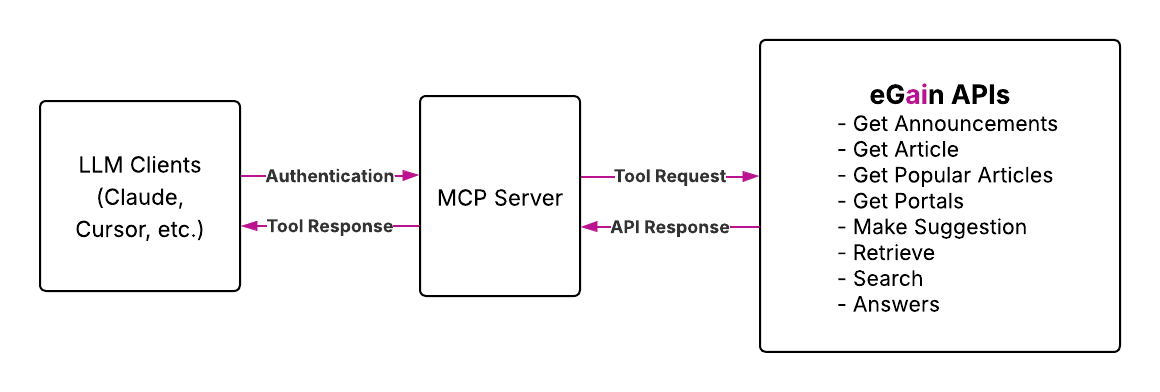
- Unified Access: One MCP endpoint integrating major knowledge-retrieval APIs for easy access to your eGain knowledge base.
- Flexible Workflows: Mix and match tools to get from "Search" to "Answers", and "Popular Articles" to "Make a Suggestion" in one seamless flow.
- LLM-Friendly Design: JSON outputs optimized for MCP-friendly LLM consumption, enabling control over your own AI agent.
- Cross-Client Compatibility: Works with a wide range of environments such as Claude, Cursor, your LLM client, and more.
Intelligent Customer Support Automation Build AI-powered chatbots that seamlessly integrate with your eGain knowledge base to provide instant, accurate customer assistance.
Agent Knowledge Enhancement Empower your human support agents with AI assistance that provides instant access to relevant knowledge base content during customer interactions.
Unified Knowledge Access Enable seamless access to company knowledge across multiple portals and systems for improved employee productivity.
User Query:
"What are the employee holidays for the employees on the eGain portal?"
MCP Steps:
- MCP grabs the query and formats it into a request.
- MCP scans state of authentication to determine whether user needs to log in.
- Request is made with the required parameters and MCP waits for response.
- Response returned to client:
{
  "answer": {
    "answerType": "extractive",
    "answerValue": "The holidays for the year 2026 are New Year's Day, Thanksgiving, and Christmas.",
        ...
    }
}
Client Response
"The holidays for 2026 for eGain employees are: New Year's Day (January 1st), Thanksgiving Day (November 26th), and Christmas Day (December 25th)."
The eGain MCP Server is compatible with a wide range of AI development environments and tools:
- Claude Desktop - Desktop application with MCP support
- Cursor - AI code editor with MCP integration
- Windsurf - AI dev environment with MCP support
- VS Code - Editor with MCP extensions
- Kiro - Amazon IDE with MCP tooling
- Antigravity - Google IDE with Gemini integration
- Gemini CLI - Terminal CLI for Gemini 3
- Get started on GitHub: eGain MCP Server
- Install from npm: @egain/egain-mcp-server
- See setup instructions: README