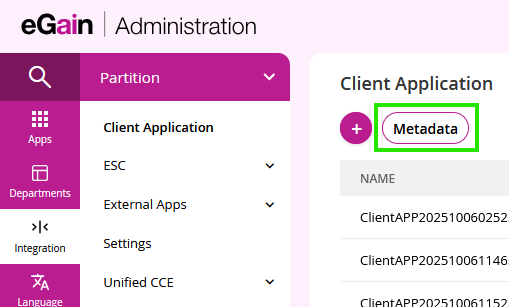
Once your client application is created, click the Metadata button on the application page to find your specific endpoints.
 |
|---|
This provides:
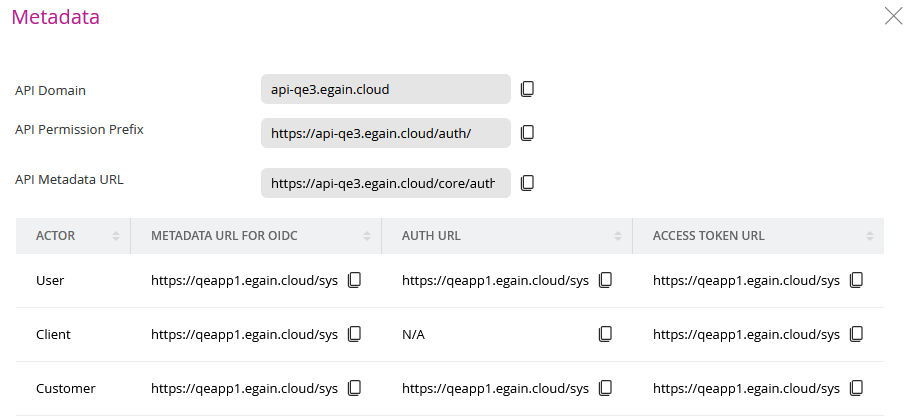
- Authorization URL: The endpoint to redirect users to for authorization. This is the URL that will redirect User/Customer to a page to login to your eGain instance to obtain an Authorization Code to be used with Auth Code/PKCE flow. Will be required for all auth flow except for client credentials, on-behalf-of, and token-exchange.
- Access Token URL: The endpoint to exchange an authorization code for an access token or to use the client credentials flow.
- Domain URL: The base URL for your eGain instance. This is the URL that you'll be making your API calls to.
- Metadata URL: The URL for your eGain instance where this metadata can be accessed.
Actors are the personas of who call the APIs.
- A User is a logged in agent.
- A Customer is a logged in non-agent.
- A Client is a server.
Example API Endpoints Metadata:
 |
|---|
Domain Usage Note: The domain used to request access tokens is https://ai.egain.cloud/, but the domain for calling the actual APIs is https://api.ai.egain.cloud/. Update your base URL once you have the token.
Next Steps: